
What is a network switch?
A network switch connects devices within a network (often a local area network, or LAN*) and forwards data packets to and from those devices. Unlike a router, a switch only sends data to the single device it is intended for (which may be another switch, a router, or a user's computer), not to networks of multiple devices.
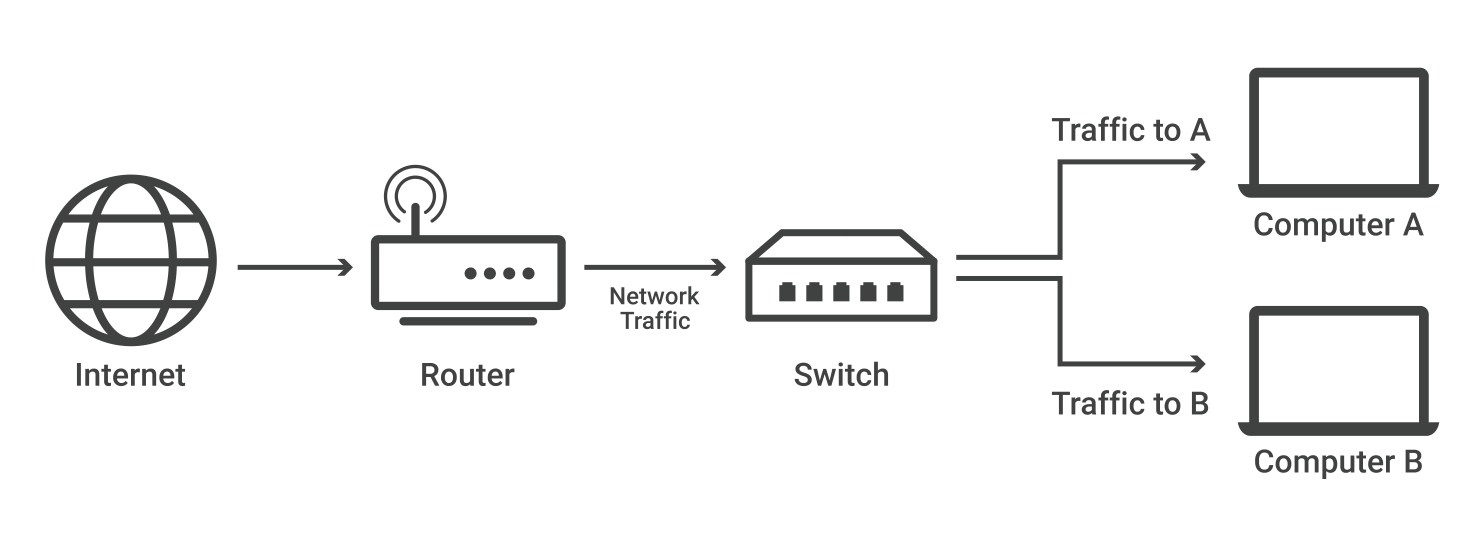
*A local area network (LAN) is a group of connected devices within close physical proximity. Home WiFi networks are one common example of a LAN.
What is the difference between a switch and a router?
Routers select paths for data packets to cross networks and reach their destinations. Routers do this by connecting with different networks and forwarding data from network to network — including LANs, wide area networks (WANs), or autonomous systems, which are the large networks that make up the Internet.
In practice, what this means is that routers are necessary for an Internet connection, while switches are only used for interconnecting devices. Homes and small offices need routers for Internet access, but most do not need a network switch, unless they require a large amount of Ethernet* ports. However, large offices, networks, and data centers with dozens or hundreds of computers usually do require switches.
*Ethernet is a layer 2 protocol for sending data between devices. Unlike WiFi, Ethernet requires a physical connection via an Ethernet cable.
What is a layer 2 switch? What is a layer 3 switch?
Network switches can operate at either OSI layer 2 (the data link layer) or layer 3 (the network layer). Layer 2 switches forward data based on the destination MAC address (see below for definition), while layer 3 switches forward data based on the destination IP address. Some switches can do both.
Most switches, however, are layer 2 switches. Layer 2 switches most often connect to the devices in their networks using Ethernet cables. Ethernet cables are physical cables that plug into devices via Ethernet ports.
What is an unmanaged switch? What is a managed switch?
An unmanaged switch simply creates more Ethernet ports on a LAN, so that more local devices can access the Internet. Unmanaged switches pass data back and forth based on device MAC addresses.
A managed switch fulfills the same function for much larger networks, and offers network administrators much more control over how traffic is prioritized. They also enable administrators to set up Virtual LANs (VLANs) to further subdivide a local network into smaller chunks.
What is the difference between a MAC address and an IP address?
Network switches refer to MAC addresses in order to send Internet traffic to the right devices, not IP addresses.
Every device that connects to the Internet has an IP address. An IP address is a series of alphanumeric characters, like 192.0.2.255 or 2001:0db8:85a3:0000:0000:8a2e:0370:7334. IP addresses act like a mailing address, enabling Internet communications directed at that address to reach that device. IP addresses often change: because there is a limited number of IPv4 addresses, user devices are typically assigned new ones when they form a new connection with a network.
IP addresses are used at layer 3, which means computers and devices all over the Internet use IP addresses for sending and receiving data, no matter which network they are connected to. All IP packets include their source and destination IP addresses in their headers, just as a piece of mail has a destination address and a return address.
In contrast, a MAC address is a permanent identifier for each piece of hardware, somewhat like a serial number. Unlike IP addresses, MAC addresses do not change. MAC addresses are used at layer 2, not layer 3 — which means they are not included in IP packet headers. In other words, MAC addresses are not part of Internet traffic. They are only used inside a given network.
How do network switches know the MAC addresses of the devices in their network?
Layer 2 network switches maintain a table in memory that matches MAC addresses to the switch's Ethernet ports. This table is called a Content Addressable Memory (CAM) table.
Suppose Computer A is connected to an Ethernet cable that plugs into the switch's Port 1, Computer B is connected to Port 2, and Computer C to Port 3. When data arrives for Computer A, the switch consults its CAM table, sees where Computer A is connected, and knows to forward Computer A-bound traffic at Port 1, not Ports 2 or 3.
The switch's CAM table would look something like this:
| MAC address | Port |
|---|---|
| Computer A's MAC address | 1 |
| Computer B's MAC address | 2 |
| Computer C's MAC address | 3 |
The switch's CAM table is stored in memory. If the switch is turned off, the table will disappear and the switch has to relearn the table when it is rebooted.
Now, suppose the switch was just turned on and has not yet created its CAM table. It does not know which ports Computers A, B, and C are connected to. It also does not know their MAC addresses.
| MAC address | Port |
|---|---|
| ? | ? |
| ? | ? |
| ? | ? |
Suppose Computer A sends a message to Computer B. The switch takes the following steps to get the message to Computer B and start filling out its CAM table:
- It records Computer A's MAC address and the port its message came in on
- It forwards Computer A's message to all other computers on the network (except Computer A); this is known as "flooding"
- When Computer B replies, it records Computer B's MAC address and port as well
| MAC address | Port |
|---|---|
| Computer A's MAC address | 1 |
| Computer B's MAC address | 2 |
| ? | ? |
Now, the switch's CAM table knows where Computer A and Computer B are. It also knows their MAC addresses.
How does Cloud flare protect network switches?
Cloud flare Magic Transit protects network infrastructure devices such as switches and routers from DDoS attack traffic that can knock them offline or compromise them. Magic Transit protects on-premise, cloud, and hybrid networks. Learn more about Magic Transit or about layer 3 attacks.
Repeaters
As signals travel along a network cable (or any other medium of transmission), they degrade and become distorted in a process that is called attenuation. If a cable is long enough, the attenuation will finally make a signal unrecognizable by the receiver.
A Repeater enables signals to travel longer distances over a network. Repeaters work at the OSI's Physical layer. A repeater regenerates the received signals and then retransmits the regenerated (or conditioned) signals on other segments.
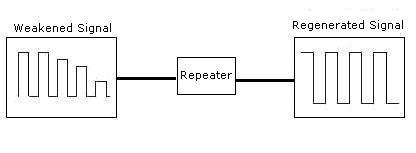
To pass data through the repeater in a usable fashion from one segment to the next, the packets and the Logical Link Control (LLC) protocols must be the same on the each segment. This means that a repeater will not enable communication, for example, between an 802.3 segment (Ethernet) and an 802.5 segment (Token Ring). That is, they cannot translate an Ethernet packet into a Token Ring packet. In other words, repeaters do not translate anything.
Bridges
Like a repeater, a bridge can join segments or workgroup LANs. However, a bridge can also divide a network to isolate traffic or problems. For example, if the volume of traffic from one or two computers or a single department is flooding the network with data and slowing down entire operation, a bridge can isolate those computers or that department.
In the following figure, a bridge is used to connect two segment segment 1 and segment 2.
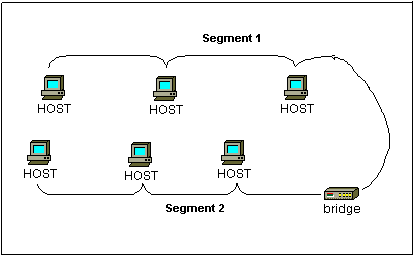
Bridges can be used to:
- Expand the distance of a segment.
- Provide for an increased number of computers on the network.
- Reduce traffic bottlenecks resulting from an excessive number of attached computers.
Bridges work at the Data Link Layer of the OSI model. Because they work at this layer, all information contained in the higher levels of the OSI model is unavailable to them. Therefore, they do not distinguish between one protocol and another.
Bridges simply pass all protocols along the network. Because all protocols pass across the bridges, it is up to the individual computers to determine which protocols they can recognize.
A bridge works on the principle that each network node has its own address. A bridge forwards the packets based on the address of the particular destination node.
As traffic passes through the bridge, information about the computer addresses is then stored in the bridge's RAM. The bridge will then use this RAM to build a routing table based on source addresses.
4.3 Routers
In an environment consisting of several network segments with different protocols and architecture, a bridge may not be adequate for ensuring fast communication among all of the segments. A complex network needs a device, which not only knows the address of each segment, but also can determine the best path for sending data and filtering broadcast traffic to the local segment. Such device is called a Router.
Routers work at the Network layer of the OSI model meaning that the Routers can switc h and route packets across multiple networks. They do this by exchanging protocol-specific information between separate networks.Routers have access to more information in packets than bridges, and use this information to improve packet deliveries. Routers are usually used in a complex network situation because they provide better traffic management than bridges and do not pass broadcast traffic.
Routers can share status and routing information with one another and use this information to bypass slow or malfunctioning connections.
Routers do not look at the destination node address; they only look at the network address. Routers will only pass the information if the network address is known. This ability to control the data passing through the router reduces the amount of traffic between networks and allows routers to use these links more efficiently than bridge
Gateways
Gateways make communication possible between different architectures and environments. They repackage and convert data going from one environment to another so that each environment can understand the other's environment data.
A gateway repackages information to match the requirements of the destination system. Gateways can change the format of a message so that it will conform to the application program at the receiving end of the transfer.
A gateway links two systems that do not use the same:
- Communication protocols
- Data formatting structures
- Languages
- Architecture
For example, electronic mail gateways, such as X.400 gateway, receive messages in one format, and then translate it, and forward in X.400 format used by the receiver, and vice versa.
To process the data, the gateway:
Decapsulates incoming data through the networks complete protocol stack. Encapsulates the outgoing data in the complete protocol stack of the other network to allow transmission.
source:-https://www.cloudflare.com/en-in/learning/network-layer/what-is-a-network-switch/
source:-https://www.tutorialsweb.com/networking/repeaters-routers-bridges-gateways.htm


0 Comments
if you have any doubt let me know